Independent software review · Updated 2026
Movavi Video Editor Review: is it still worth it in 2026?
I spent a week editing real projects in Movavi Video Editor Plus — vlogs, a client promo and a 4K travel cut. Here is the honest verdict on speed, features, pricing and who should actually buy it.
Affiliate disclosure: links on this page are affiliate links. If you buy through them I may earn a commission at no extra cost to you.
The verdict: 4.4 / 5
The best desktop editor for people who want finished videos, not a new career in post-production. Fast, forgiving and cheap compared with a Creative Cloud subscription.
- Ease of use
- 4.8
- Features
- 4.2
- Export speed
- 4.5
- Value for money
- 4.3
What is Movavi Video Editor?
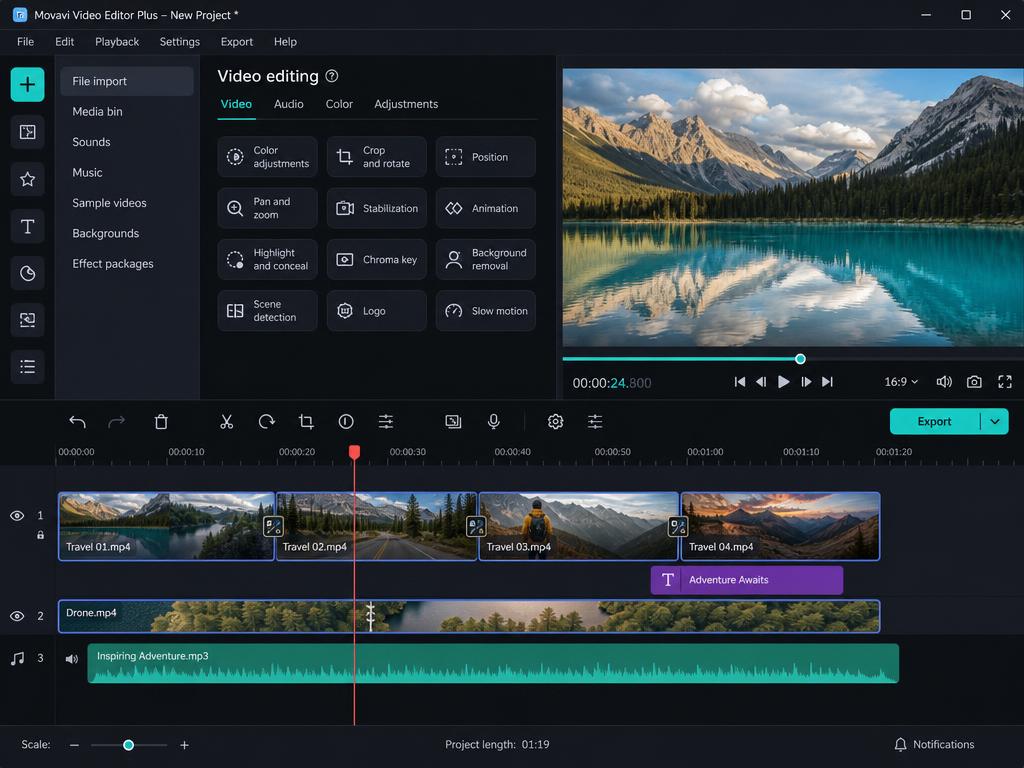
Movavi Video Editor (sold as Video Editor Plus) is a desktop editing app for Windows and macOS aimed at hobbyists, YouTubers, teachers and small businesses. You get a multi-track timeline, drag-and-drop transitions, titles, filters, keyframe animation, chroma key, motion tracking and AI-powered background and noise removal — wrapped in an interface that does not require a tutorial marathon.
It sits deliberately between phone apps like CapCut and professional NLEs like Premiere Pro: more control than the former, far less friction than the latter.

Movavi Video Editor pros and cons
What I liked
- ✓Genuinely beginner-friendly — you can cut a first video in under 30 minutes
- ✓Fast HD and 4K exports with hardware acceleration
- ✓Large built-in library of transitions, titles, filters and stock-style assets
- ✓AI helpers: background removal, noise removal, motion tracking
- ✓Runs comfortably on modest laptops, Windows and Mac
What held it back
- –Not a replacement for Premiere Pro or DaVinci Resolve on complex projects
- –The free trial watermarks exports
- –Advanced colour grading and audio mixing are basic
- –Some of the best effect packs are sold as add-ons
Movavi Video Editor pricing
Movavi sells a free trial (watermarked exports), an annual subscription and a one-off lifetime licence, usually bundled with its video suite. Prices change with regular seasonal discounts, so check the live page before buying — the lifetime licence is normally the better deal if you edit more than a few videos a year.
Free trial
Full feature access for a limited period. Exports carry a watermark.
1-year subscription
Watermark-free exports, updates and support for twelve months.
Lifetime licence
One payment for the current version. Best value for regular editing.
Movavi alternatives worth comparing
DaVinci Resolve
Free and vastly more powerful, but a steep learning curve and heavy hardware demands.
Adobe Premiere Pro
Industry standard for professionals, subscription-only and overkill for casual editing.
Filmora
Closest rival to Movavi — similar ease of use, slightly flashier effects, comparable pricing.
Movavi Video Editor review FAQ
Is Movavi Video Editor free?
There is a free trial, but exports are watermarked and the trial is time-limited. A subscription or lifetime licence removes the watermark.
Is Movavi good for beginners?
It is one of the easiest desktop editors to learn. Most people are cutting and exporting within an hour, with no tutorials required.
Does Movavi work on Mac?
Yes — Windows and macOS, including Apple Silicon. Performance on modest hardware is one of its strengths.
Can Movavi edit 4K video?
Yes. 4K import and export are supported, and hardware acceleration keeps render times reasonable on mid-range machines.
Ready to try Movavi Video Editor?
Start with the free trial, cut one real video, and decide from there. If it clicks, the lifetime licence is the cheapest way to keep it.